List of 17 Million WordPress Websites
The Ultimate WordPress Intelligence Dataset

What Is This Dataset?

This List of 17 Million WordPress Websites is a large-scale database of websites that are actively running on the WordPress CMS. Instead of manually detecting WordPress sites through scraping or expensive tools, this dataset provides a ready-to-use structured list of verified WordPress-powered domains.

It is built for agencies, SaaS companies, hosting providers, plugin developers, security companies, and marketers targeting the WordPress ecosystem.

What’s Included

• 17,000,000+ verified WordPress websites
• Domain name
• HTML title tag
• Niche categories
• Meta description
• Top-Level Domain (.com, .net, .org, .io, country TLDs, etc.)
• WordPress detection verification

Each website in the list has been identified as running WordPress, making it highly valuable for targeted outreach and ecosystem-specific campaigns.

Key Use Cases

WordPress Agency Prospecting
Find businesses already using WordPress and offer redesigns, SEO services, performance optimization, or maintenance packages.

Plugin & Theme Marketing
Promote plugins, themes, SaaS tools, or integrations directly to WordPress site owners. This dramatically improves targeting compared to generic website lists.

Hosting & Infrastructure Sales
Identify WordPress users and pitch managed WordPress hosting, CDN services, backups, security solutions, or optimization tools.

Security & Compliance
Target WordPress websites for vulnerability scanning services, malware protection, firewall solutions, and update management.

Market Research
Analyze WordPress adoption across industries and TLDs. Identify saturation levels in specific niches or geographic regions.

AI & Data Analysis
Use WordPress-specific data to train classification models, detect CMS trends, and analyze web technology distribution.

Who This Is For

• WordPress agencies
• Plugin & theme developers
• Hosting providers
• SaaS companies
• Security firms
• SEO professionals
• Growth teams
• Data analysts & researchers

If your business targets WordPress users, this dataset gives you immediate access to millions of qualified prospects.

Download & File Formats

The dataset is delivered as a compressed .zip download and is approximately 3.9GB uncompressed.

It includes:

• MySQL dump for database deployment
• CSV files for Excel, Google Sheets, and analytics tools

Training & Support

Full setup guidance is included. You’ll receive step-by-step instructions on: • Importing into MySQL
• Filtering by TLD or keywords
• Filtering by niche
• Extracting targeted CSV segments
• Running queries for niche segmentation

Even if you’re new to handling large datasets, the instructions make it simple and efficient.

In Short

This List of 17 Million WordPress Websites gives you direct access to one of the largest CMS ecosystems in the world.

Instead of guessing which sites run WordPress, you get a structured, verified dataset ready for outreach, research, and growth.

Dataset Pictures

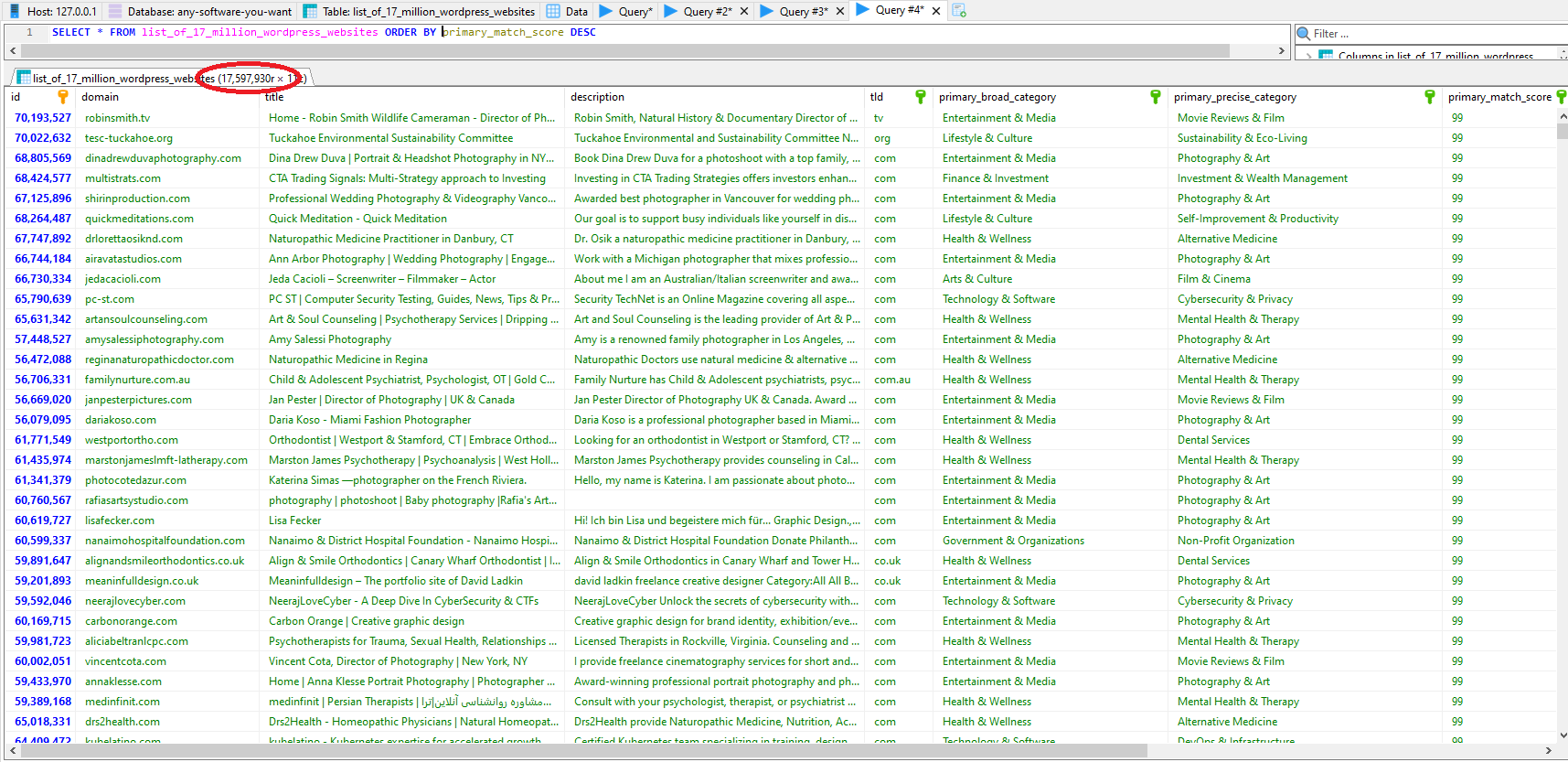
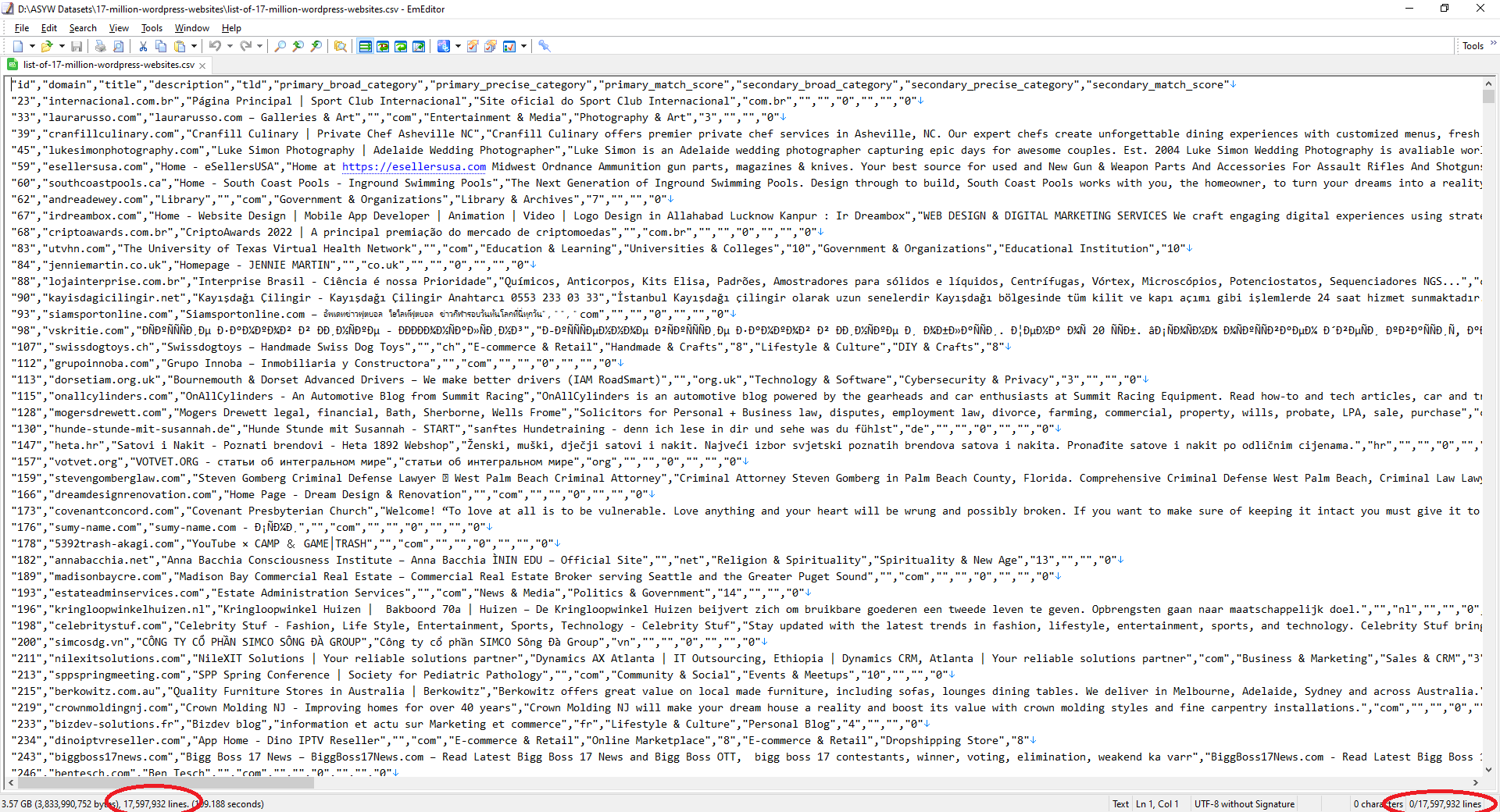
CSV File CSV File of 17 million WordPress websites

MySQL Table MySQL table of 17 million WordPress websites


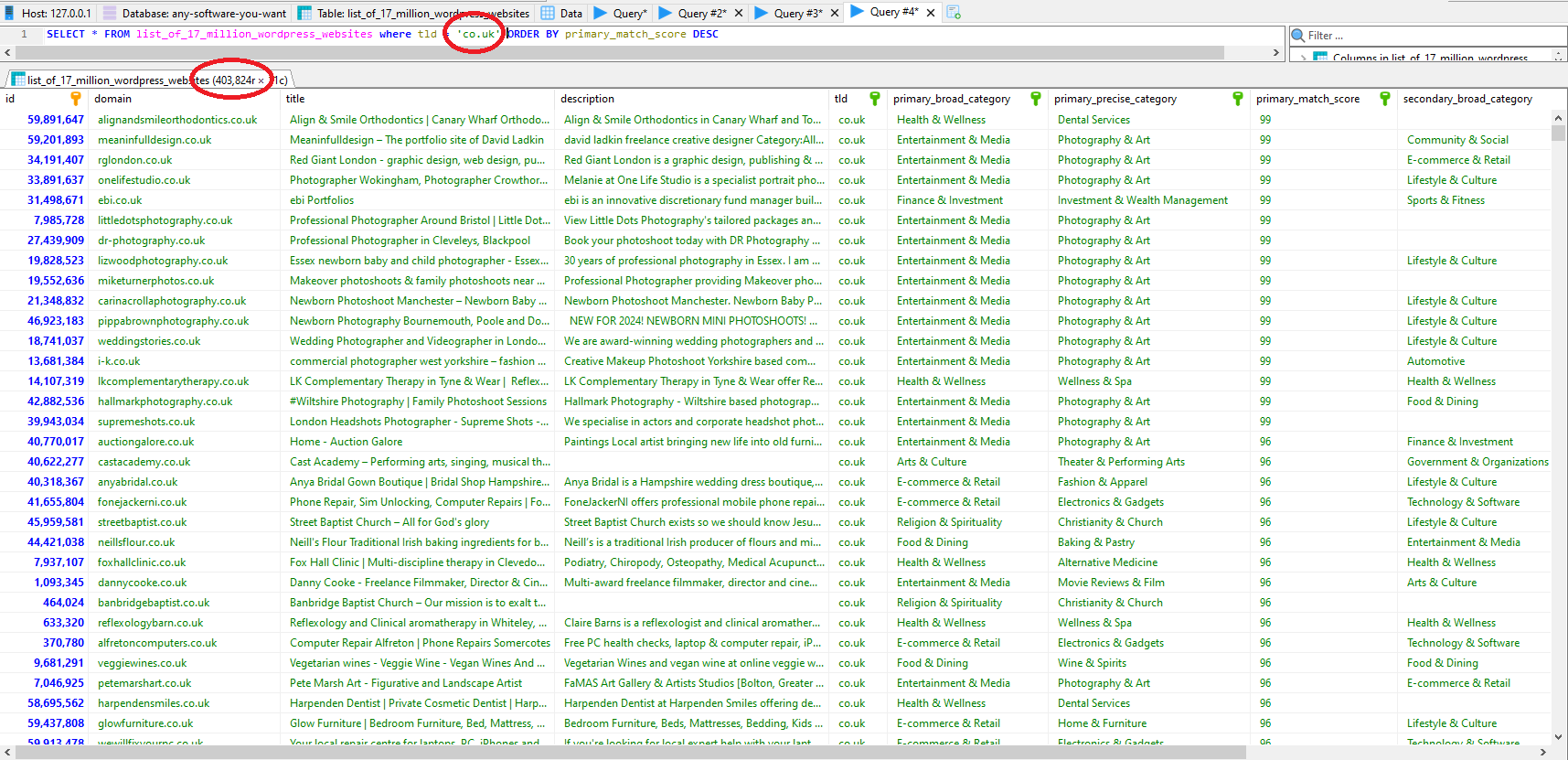
MySQL Table Filtered By TLD MySQL table of 17 million WordPress websites filtered by TLD

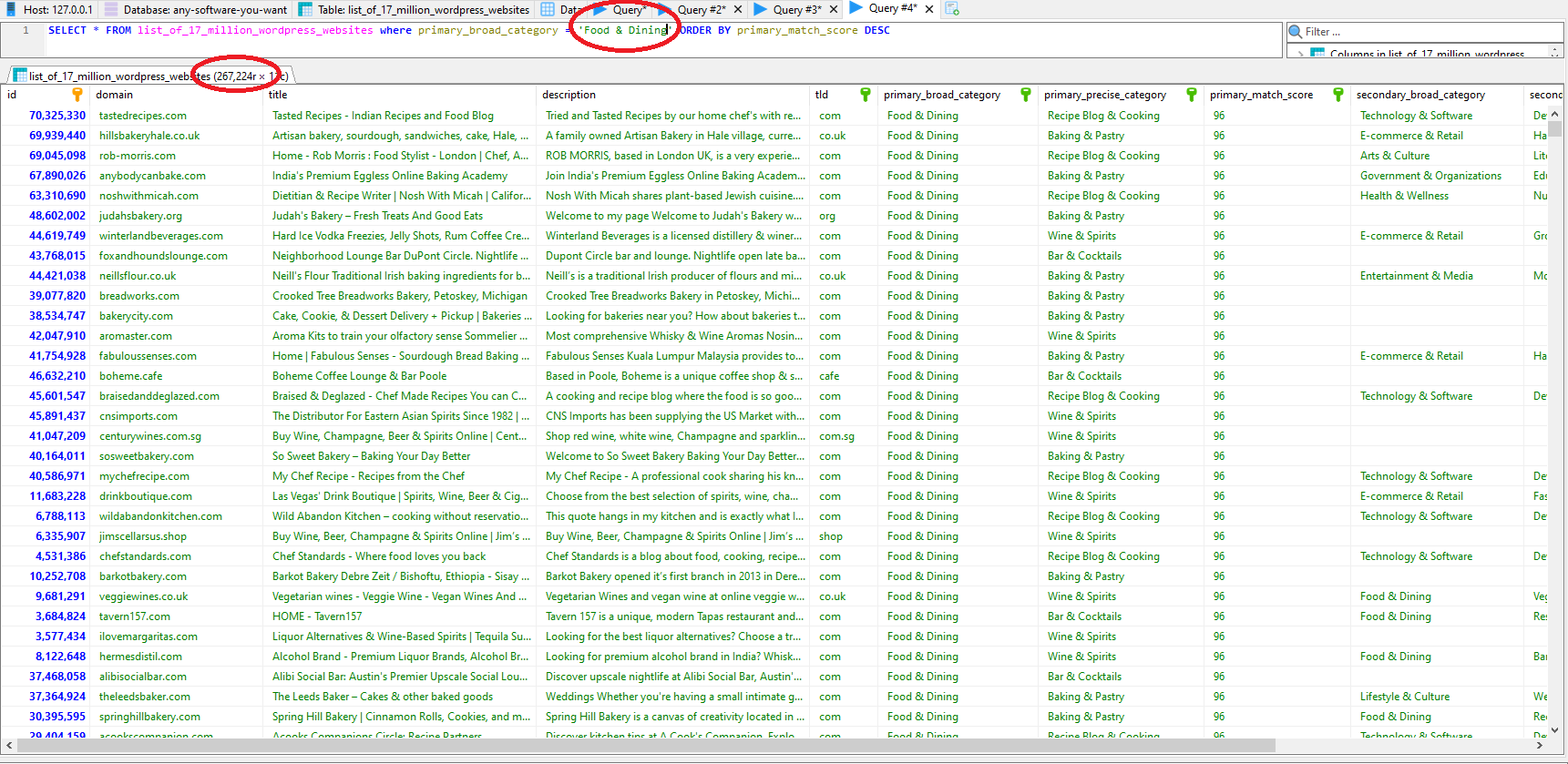
MySQL Table Filtered By Niche MySQL table of 17 million WordPress websites filtered by niche

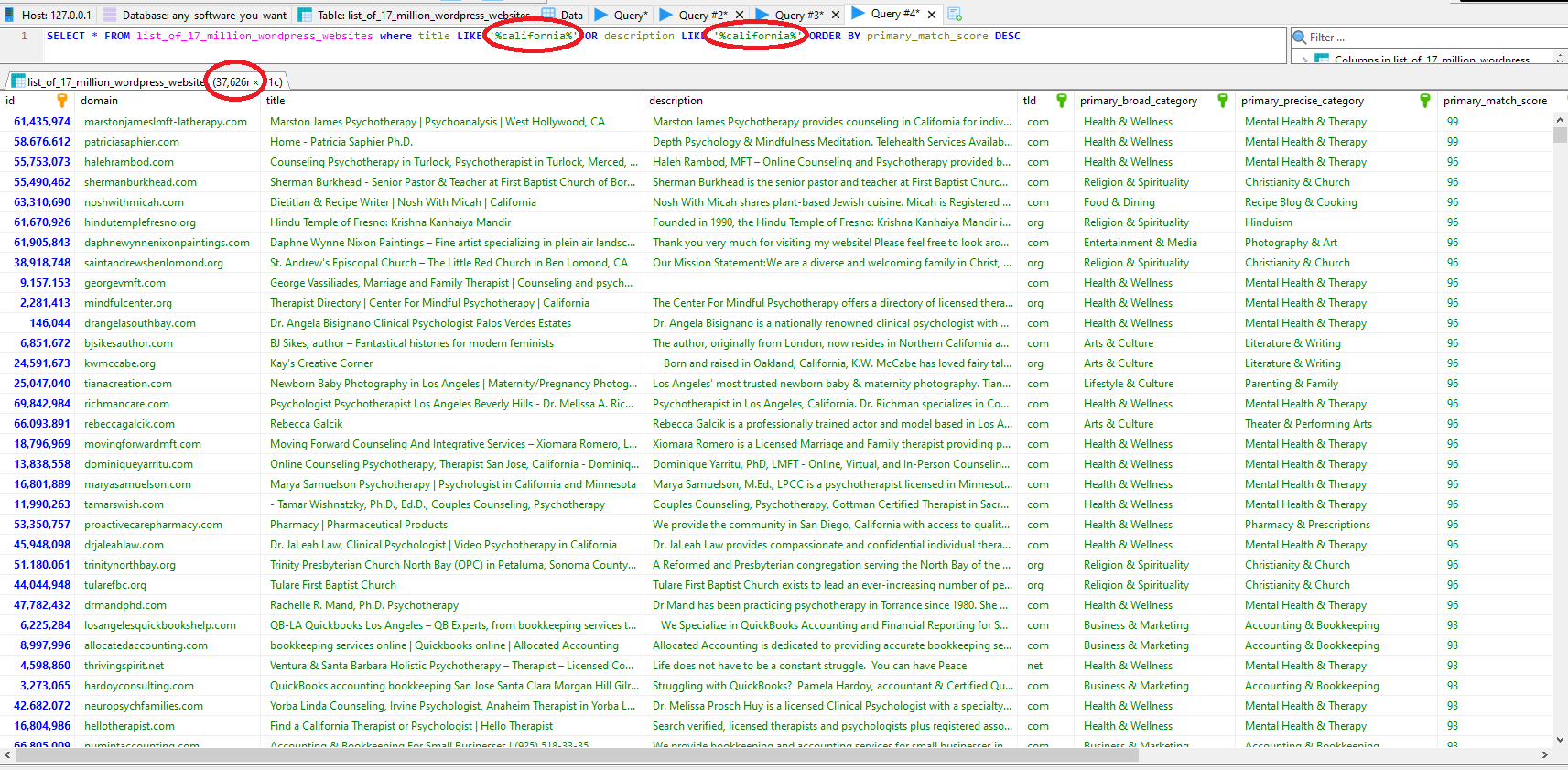
MySQL Table Filtered By Keywords (California) MySQL table of 17 million WordPress websites filtered by keywords

Video Demo


Hi everyone, it's Jamie from anysoftwareyouwant.com and in this video we're going to give you a lightning quick demo of our huge dataset of 17 million WordPress websites. Now this dataset is actually a bit bigger than 17 million websites, it's actually 17.6 million but we like to overdeliver here because often websites can go offline quickly etc. So we've compiled this dataset from various web crawlers that we run and every website has been verified programmatically as running the WordPress CMS. So this dataset is provided in both a MySQL dump format that you can import into a MySQL database which you see here and also CSV format which we'll cover later in the video and full training is provided upon purchase in a video format that shows you how to import and how to work with these large datasets on your local computer. So let's just have a quick browse through the data before we show you some examples of how you can filter down different types of data within the dataset. So we've got our domain here then we've got the title and a description we've extracted from every website in the dataset, we've got a TLD here, top level domain so you can filter down to Canadian or UK websites for example. And then finally we've got our categories here. Now how our category system works is pretty simple, we have a predefined set of keywords and every website in the dataset we check if those keywords are in the title and that will tell us for example if a website has the word gym in their title and description then it's probably in the fitness niche and we use a bunch of other keywords like a very large set for each niche and we'll try and work out which niche, which category it fits into best. Now we do provide a primary and a secondary categorization because often for example a blog will spam multiple topics. So we also give a broad and then a precise category as well. So for example a broad category can be entertainment and media and then a more precise could be photography and art for example. And we also provide a score of the matching of those keywords so that score will tell you how confident we are that that website fits within that category. So if you're doing some outreach and it's really important that you only message for example fitness websites because if you message a website that's in the finance niche for example then people might mark your messages spam etc. So you can set your own match score to make sure you're only messaging people that really are within a certain category or niche. So for our first demo now we're going to find all websites that are anything to do with cryptocurrency and blockchain technology. So here you can see we're using the precise category here and you can see we found over 29,000 WordPress websites that are in the crypto niche. So obviously if you run some sort of web design agency and you specialize in WordPress websites and you specialize with crypto clients you know this is an incredible data set to use. For our next demo we're just going to simply filter down to the TRD of TRU UK and as you can see here we've got over 400,000 WordPress websites that are based in the UK. And again if you own a UK web development agency that specializes in WordPress this is a great asset for you. Now we'll show you how to use the CSV format that's provided. So the CSV files are quite big so you probably won't initially be able to open them up within a standard spreadsheet tool so you'll have to use something like EM Editor which is free to open them up. Now here we have a PowerShell command and as I said all these commands are available upon purchase to show you how to do different things with the CSVs and this command here we're simply filtering to any line that contains London so we'll output those to a new CSV which will be smaller and we'll be able to open that up in most spreadsheet solutions. So we come back a couple of minutes later and that PowerShell command has worked its way through the big CSV and we've now created a smaller CSV which is London based companies only. So again this is great if you're the owner of a for example web development company in the UK and you're based in London and you specialize in WordPress you've now got thousands and thousands of potential clients as you can see we've got. Just under 53,000 WordPress websites that are based in London. So that concludes our demos for now we hope you can see how powerful these data sets are for lead generation and various big data projects. As I said earlier full training is provided upon purchase that will show you how to work with these large data sets on your local machine efficiently and that's it. Thank you for watching.


top